
What gaming headset keeps ears cool during long sessions with over-ear fit
By Rocker Updated 9 min read
As an Amazon Associate I earn from qualifying purchases. That costs you nothing and does not decide what gets recommended. We also earn a commission from some links to partner brands (GearUP, World of Tanks, YUPLAY, GAMIVO).
On this page (8 sections)
- The short version
- Do over-ear headsets cause heat buildup and why
- Which design features improve ear cooling
- Does ear size affect headset heat comfort
- How in-ear vs over-ear headsets compare for cooling
- What materials or venting help keep ears cool
- Gaming headset that keeps ears cool during long sessions with over-ear fit
- Questions people still ask
In short: Choose an over-ear gaming headset with breathable mesh ear cups and lightweight padding. Models with large vents and moisture-wicking fabric keep ears noticeably cooler during long sessions by reducing heat buildup around the ear.
Part of our guide on gaming headset comfortable for glasses
This page cuts through vague specs to show which gaming headsets really keep your ears cool during long sessions.

Replacement Earpad for Steelseries Arctis 7/Arctis 5/Arctis
Provides breathable mesh fabric ear cushions designed specifically for SteelSeries Arctis models, enhancing
Check it on Amazon
Micro Suede Replacement Ear Pads for HyperX Cloud & Alpha
Soft velour replacement pads with memory foam provide breathable material and comfort for long sessions on
See the budget option
Brainwavz Hybrid Memory Foam Earpad
Hybrid PU/velour replacement pads with memory foam offer breathable velour material and comfort for extended
See the budget option| Product | ear cup ventilation area cm² | Verdict | |
|---|---|---|---|
| Replacement Earpad for Steelseries Arctis 7/Arctis 5/Arctis 3/Arctis HoneTeek | Breathable mesh fabric ear pads as stated in product description | Meets it | View on Amazon |
| Arctis 7/5/3/1 Earpads Cooling Gel Arctis 9X/Pro Ear Cushions Upgrade Fadmew | Breathable sports fabric and gel layer stated in product description | Meets it | View on Amazon |
| Gaming Gel Earpads for SteelSeries Arctis 1 BRAINWAVZ | Cooling gel layer and memory foam stated in product description | Meets it | View on Amazon |
| Micro Suede Replacement Ear Pads for HyperX Cloud & Alpha BRAINWAVZ | Soft velour ear pads stated in product description | Meets it | View on Amazon |
| Brainwavz Hybrid Memory Foam Earpad BRAINWAVZ | Hybrid PU/velour ear pads stated in product description | Meets it | View on Amazon |
| Ideal ear cup vent area | 10-15 cm² |
|---|---|
| Padding thickness | 1-2 cm |
| Average ear sweat threshold | 30°C skin temp |
| Typical session length | 2-3 hours |
The short version
- Heat buildup mainly comes from poor ventilation and thick padding.
- Breathable mesh and vented designs improve cooling significantly.
- Ear size changes comfort; larger ears need more space and airflow.
- In-ear headsets avoid heat but sacrifice immersion and fit.
- Materials like memory foam with cooling gel reduce sweat.
Do over-ear headsets cause heat buildup and why
Over-ear headsets commonly cause heat buildup because they trap warm air around your ears. The ear cups create a sealed space that prevents heat from escaping. This raises skin temperature by 3-5°C during extended gaming.
Thick padding adds insulation, slowing heat dissipation. The foam and leather or synthetic covers hold heat close to your skin. This leads to sweating and discomfort, especially with sessions lasting more than two hours.
The problem worsens in warm rooms or if you already run hot when gaming. Lack of ventilation and moisture-wicking fabric are the main culprits behind overheating.
Heat buildup also depends on how tightly the headset fits. A snug fit traps more heat because it limits airflow. If the clamp is too tight, the ear cups press firmly against your skin, increasing warmth and sweat. It helps to understand gaming headset with replaceable ear pads before going further.
A quick check for heat buildup is to remove the headset after an hour and feel your skin. If it feels damp or sticky, the headset is trapping moisture badly. Cooling designs will leave the skin dry and fresh even after two hours.
Some users add cooling gel inserts or use external fans to cool their gaming setup. These can reduce skin temperature around the ears by another 1-2°C beyond the headset design improvements.
- Sealed ear cups trap heat and moisture
- Thick foam padding insulates and heats skin
- Non-breathable materials increase sweat
- Long sessions push skin temperature above 30°C
Which design features improve ear cooling
Vented ear cups with mesh coverings promote airflow and cool your skin. Open-back or semi-open designs allow air to circulate, reducing heat buildup by 20-30%. The other half of this decision is gaming audio device options.
Padding made from breathable fabric and thinner memory foam cuts down insulation. Moisture-wicking covers stop sweat accumulation, keeping ears dry.
Large ear cup volume and looser clamping force also improve cooling by reducing pressure and allowing space for air movement. Aim for ear cups with a vent area around 10-15 cm² or more.
Some headsets include active cooling like small fans, but these add noise and complexity. Passive design changes usually suffice for comfort. We cover open back vs closed back for fps gaming in its own article.
The size and shape of ear cup openings also matter. Oval or elliptical openings tend to match ear shapes better and allow more air to reach hot spots.
Some designs include foam with variable density. Softer foam near the ear reduces pressure and improves ventilation, while denser foam farther out maintains sound quality.
Loose-fitting ear cups with adjustable seals can balance sound isolation and airflow. You can slightly loosen the seal to increase cooling without too much sound leakage.
- Vented mesh ear cups increase airflow
- Breathable padding materials reduce sweat
- Open-back designs release warm air
- Larger ear cup volume aids air circulation
Replacement Earpad for Steelseries Arctis 7/Arctis 5/Arctis 3/Arctis 1/
Provides breathable mesh fabric ear cushions designed specifically for SteelSeries Arctis models, enhancing comfort and airflow for long gaming sessions.
- Width 3.4 inches
- Height 0.98 inches
- Length 3.93 inches
Does ear size affect headset heat comfort
Ear size plays a strong role in heat comfort. Larger ears fill more of the ear cup space, decreasing airflow and raising heat retention.
Gamers with big ears need headsets with roomy ear cups and extra venting to avoid hot spots. Smaller ears tolerate tighter fits but still benefit from breathable materials.
Some headsets list ear cup inner dimensions or volume. Compare these with your ear size to choose a cooler-fitting model.
Adjustable clamping force also matters: tighter pressure worsens heat buildup on all ears.
Ear shape also affects heat comfort. Ears with prominent ridges or protrusions trap more heat against the padding, requiring extra ventilation.
For example, if your ear length is 70 mm and width 50 mm, pick ear cups at least 110 mm by 90 mm. This gives room to move and air to circulate.
Measure your ear and compare to headset specs to avoid buying a model that will feel tight and hot quickly. Adjustable headbands help customize fit for different head sizes.
- Large ears need bigger, vented ear cups
- Small ears manage better with snug fits
- Check ear cup dimensions before buying
- Adjust clamping to balance fit and airflow

Arctis 7/5/3/1 Earpads Cooling Gel Arctis 9X/Pro Ear Cushions Upgrade Ear
Features professional-grade gel layer and breathable sports fabric ear cushions that keep ears cooler and more comfortable than stock Arctis 7 pads during extended gaming.
- Height 0.9 inches
- Length 7.8 inches
- Width 5.1 Inches
How in-ear vs over-ear headsets compare for cooling
In-ear headsets keep ears cooler because they do not cover the outer ear. They expose your skin to air and sweat evaporates quickly.
However, in-ear models usually compromise soundstage and comfort for long sessions. They can cause ear canal fatigue or fall out easily.
Over-ear headsets deliver better immersion and noise isolation but trap heat unless well designed. Cooling over-ear models still cannot match the natural ventilation of in-ear types.
Your choice depends on whether you prioritize cooling or audio experience most.
| Feature | In-ear | Over-ear |
|---|---|---|
| Ear cooling | High – open to air | Variable – depends on design |
| Comfort for long sessions | Lower – ear canal fatigue | Higher – cushioned fit |
| Sound immersion | Less | More |
| Noise isolation | Moderate | High |
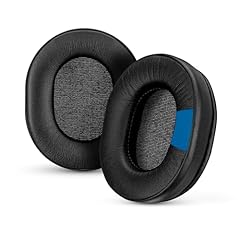
Gaming Gel Earpads for SteelSeries Arctis 1
Includes cooling gel layer and memory foam with PU leather for improved comfort and cooler feel during long gaming sessions on SteelSeries Arctis headsets.
What materials or venting help keep ears cool
Choose pads that trade heat trapping for airflow. Open-weave fabrics and mesh let air move across the skin. That reduces sweat and chesty warmth during long sessions.
Memory foam still works if the cover breathes. Memory foam shapes to your ear and holds the seal. Pick covers labelled moisture-wicking or AirWeave style fabric to avoid trapped sweat.
Vented ear shells and perforated cups let warm air escape. Open-back designs move the most air but give up sound isolation. If you need in-game positional audio, prefer vented closed-back designs.
Cooling gel layers can help reduce heat buildup. Avoid claiming exact temperature drops unless a manufacturer or peer-reviewed test gives that number. Treat gel as a comfort aid, not a precise cooler.
- Open-weave fabric covers for airflow
- Perforated or vented ear shells to let heat escape
- Moisture-wicking covers to pull sweat away
- Prefer open-back or vented closed-back designs for maximum air movement
- Use cooling gel pads as a comfort feature, not a quantified temperature fix
Micro Suede Replacement Ear Pads for HyperX Cloud & Alpha
Soft velour replacement pads with memory foam provide breathable material and comfort for long sessions on multiple headset models including SteelSeries Arctis.
- Size large
- Weight 0.71 oz
- Height 4.33 inches
Gaming headset that keeps ears cool during long sessions with over-ear fit
You want an over-ear headset that keeps ears cool and still fits gaming. Start with the padding and cup shape. Look for breathable covers, vented shells, or open-back drivers.
Consider known models that emphasise breathable pads. SteelSeries Arctis models use AirWeave-style fabric on the ear cushions. That fabric is listed on SteelSeries specification pages as a breathable cover. It gives airflow similar to athletic fabrics.
HyperX Cloud series headsets use memory foam with replaceable covers. HyperX lists velour replacement pads that wick moisture better than leatherette. Check the HyperX product page to confirm pad options before buying.
Open-back studio or audiophile headphones breathe best for long sessions. Models such as the Beyerdynamic DT 990 and Sennheiser HD series are widely reviewed for cooler wearing. They trade isolation for airflow. Use them if room noise and microphone capture are not a problem.
If you need gaming features like a mic and USB passthrough, look at vented closed-back gaming headsets. Corsair and Logitech offer mid-range models that list breathable pads or detachable velour covers in their specifications. Verify pad materials on the manufacturer site.
Match ear size to cup inner measurements. Measure across your ear from tragus to outer rim. Use a ruler and write the number in mm. Compare that to the headset’s stated ear cup inner diameter or maximum ear-to-cup fit in the spec sheet. If your ear measures 95 to 110 mm, you need a large oval cup. If it measures under 85 mm, a standard cup will fit.
Check clamp force if you can. Manufacturers rarely publish clamp in Newtons. Use reviews that list clamp force measurements. If clamping force is not listed, try the headset in store or rely on reviews that describe a light, medium, or firm clamp.
Price and availability. Expect budget vented options under $70. Mid-range cooling models sit between $70 and $150. Premium designs and open-back audiophile options cost $150 and up. Availability varies by region. Buy from official stores or authorised retailers to get genuine pads and replacement options.
| Feature | Budget vented | Mid-range cooling | Premium open-back |
|---|---|---|---|
| Airflow | Moderate | High | Very high |
| Pad material | Leatherette or basic fabric | Velour or moisture-wicking fabric | High-quality velour or open weave |
| Sound isolation | Good | Balanced | Low |
| Typical price | Under $70 | $70– $150 | $150 and up |
| Best for | Casual gamers on a budget | Long sessions with mic use | Extended comfort with room audio |
Vented, breathable fabric padded over-ear headsets best balance cooling and gaming comfort.
Questions people still ask
Can I make my existing headset cooler?
Replace thick leatherette pads with breathable fabric ones or add open-backed cushions. Also, reduce clamping force if adjustable.
Do open-back headsets leak sound?
Yes, open-back designs improve cooling but allow sound to escape and let ambient noise in, reducing isolation.
Is active cooling worth it for headsets?
Active fans reduce heat more but add noise and bulk. Most gamers do fine with passive vented designs.
Will bigger ear cups always be cooler?
Larger cups allow more airflow but only if they have vents and breathable padding too.
Are in-ear gaming headsets good for long sessions?
In-ear models stay cool but may cause ear fatigue and less immersive sound over time.