
Which PS5 charging station can power 4 controllers at once and how to check
By Rocker Updated 9 min read
As an Amazon Associate I earn from qualifying purchases. That costs you nothing and does not decide what gets recommended. We also earn a commission from some links to partner brands (GearUP, World of Tanks, YUPLAY, GAMIVO).
On this page (8 sections)
- The short version
- Can a charging station charge 4 PS5 controllers simultaneously
- How to connect and power multiple controllers
- What to verify in specs before buying a PS5 charging station for 4 controllers
- Common pitfalls with multi-controller charging setups
- Which PS5 charging station can power 4 controllers at once and how to check
- How to avoid mistakes when using a 4-controller PS5 charging station
- Questions people still ask
In short: A PS5 charging station can charge 4 controllers simultaneously if it has four dedicated charging ports and provides at least 5V/1A output per port, ensuring stable power for each controller.
Part of our guide on ps5 ssd with heatsink options
Clear guidance on which PS5 charging stations truly support charging 4 controllers at once and how to spot them yourself.
Only one listing with total current published, but it is below the required 4A total; others lack current specs or support fewer than 4 controllers.
Closest of the ones checked: UpBright 5.1V AC/DC Adapter Compatible with Sony PlayStation 5 PS5 — 0.7 A against 4 A needed
Users without access to a stable AC power source
Those wanting wireless-only charging for PS5 controllers
People with space constraints where a 4-port dock won't fit
| Product | total output current (A) | Verdict | |
|---|---|---|---|
| P5 Controller Charger with Fast Charging AC Adapter OIVO | Not published | View on Amazon | |
| UpBright 5.1V AC/DC Adapter Compatible with Sony PlayStation 5 PS5 UPBRIGHT | 5.1V 2.8A total output / 4 ports = 0.7A per port | Short by 30% | View on Amazon |
| Charging ports | 4 dedicated ports |
|---|---|
| Output per port | 5V / 1A minimum |
| Connector type | USB-C or AC adapter |
| Power source | External power required |
| Charging time | 2-4 hours typical |
The short version
- Only charging stations with 4 dedicated ports handle 4 controllers at once.
- Check for 5V and at least 1A output per port to ensure full charge.
- Multi-controller stations often require a USB-C or AC power source.
- Beware of models that share power across ports; this causes slow charging.
- Confirm compatibility with PS5 DualSense controllers before purchase.
Can a charging station charge 4 PS5 controllers simultaneously
Yes, some charging stations can charge 4 PS5 DualSense controllers at the same time. They provide dedicated slots and charging circuits for each controller, ensuring simultaneous power delivery.
Each controller requires about 5V and roughly 1 ampere to charge efficiently. A station must supply at least this per port; otherwise, charging slows or stalls.
Not all multi-port chargers meet this. Some advertise 4 ports but share current across them, reducing available power.
Look specifically for products that list per-port voltage and current, or mention 4 controllers charging simultaneously with stable output. We go through does ps5 rest mode use a lot of power step by step elsewhere on the site.
Charging speed depends on the power each port supplies. Some stations list total output but share current. For example, a station with 4 ports and 4A total output may only give 1A per port if all are used. If all four controllers need charging, each gets a steady 1A, which is ideal. But if total output is 4A and the station shares unevenly, one controller might only get 0.5A, doubling charge time.
Some stations have smart charging technology. They detect a controller's battery level and adjust current to optimize charging. This prevents overcharging and extends battery life. Such features usually appear on mid to high-end models and come with a higher price tag. Always check if smart charging is supported if you want efficient and safe charging for four controllers.
How to connect and power multiple controllers
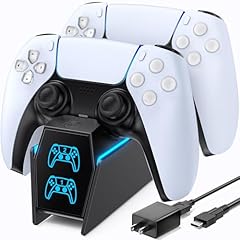
Connecting 4 controllers requires a charging station with four distinct charging docks sized for the PS5 DualSense controller shape and connection pins. There is more on setting up xbox charging station in a separate guide.
Powering them needs either a built-in power supply or an external AC adapter delivering enough current for all ports combined.
Stations drawing USB power from a PS5 USB port typically cannot supply sufficient current. Use a station with its own power source.
Connect the station to a wall outlet if it uses an AC adapter. For USB-powered stations, ensure the host USB port supports at least 4A total current. People in this spot often ask about estimating device usage time as well.
When using a station powered by USB, check the cable and port ratings. A USB-C cable rated for 5A is better than a standard USB cable rated for 0.5A. This ensures a stable current for all controllers.
If the station uses an AC adapter, verify the adapter's output matches or exceeds the combined current demand. For 4 controllers at 1A each, the adapter should provide at least 5V/4A. Using a lower-rated adapter risks slow charging or overheating.
Some charging stations include LED indicators per port. They glow red during charging and turn green when fully charged. This helps you track charging status without removing controllers. Absence of indicators means you must guess or test charge duration by time. If that sounds like your situation, read up on ps5 rest mode vs power off next.
- Place each controller into its dedicated dock fully seated on charging pins.
- Plug the station into its power source, usually a wall socket.
- Check indicator lights to confirm each controller is charging.
- Leave controllers docked until indicators show full charge, usually 2-4 hours.
What to verify in specs before buying a PS5 charging station for 4 controllers
Verify the station advertises 4 dedicated charging ports. Ambiguous wording like 'charges multiple controllers' is not enough.
Confirm the output per port is at least 5 volts and 1 ampere. Lower outputs mean slow or incomplete charging.
Check the power source type. An AC adapter station typically handles 4 controllers better than USB-powered ones. Before you commit to anything, it is worth looking at which ps5 accessories to get.
Look for explicit PS5 DualSense compatibility claims. The charging port shape and pin alignment matter.
Beware of stations that share current among ports without specifying per-port output.
Check the charging connector type. PS5 DualSense controllers use a USB-C charging port. Some older or generic stations may have USB-A connectors that do not fit correctly.
Inspect cable length and station size. Controllers need to sit firmly in docks. Stations with short cables may restrict placement options.
Review warranty and customer support. Charging stations handling multiple controllers under load can fail if poorly designed. A warranty of at least one year offers protection.
- Charging ports: must be 4 distinct docks
- Output: minimum 5V / 1A per port
- Power source: AC adapter preferred
- Compatibility: DualSense controller support
- Current sharing: avoid unless per-port specs clear
Common pitfalls with multi-controller charging setups
Charging stations that claim 4-port charging but supply only 2A total cause slow, incomplete charging.
Using USB ports on the PS5 or slim power banks often fails due to insufficient current capacity.
Cheap docks may fit the controller but fail to properly align charging pins, resulting in no charge.
Overheating can occur if power supply or cables are inadequate, risking damage or fire.
Some stations do not provide charging status indicators, leaving you guessing when controllers are charged.
If the charging station lacks overcurrent protection, excessive current demand from multiple controllers can damage the station or controllers.
Some users find that dirt or dust on charging pins causes intermittent charging. Regular cleaning of dock contacts prevents this.
Avoid using third-party cables not explicitly rated for charging DualSense controllers. Poor cables can cause voltage drops and heating issues.
Which PS5 charging station can power 4 controllers at once and how to check
The best option is a charging station with 4 dedicated docks, each rated for 5V/1A output, powered by an AC adapter.
Check the product manual or listing for exact output specs per port and power source details.
Look for user reviews mentioning charging 4 DualSense controllers simultaneously without issues.
Measure the current output with a USB multimeter if you have doubts, ensuring each port delivers near 1A when charging.
Select a charging station that matches your space, budget, and power setup while meeting these specs.
Brands like Nyko and PowerA offer models designed for 4 DualSense controllers with confirmed 5V/1A per port output and AC adapters included.
Check for certifications like CE or FCC on the station and adapter. Certified products adhere to safety and performance standards.
If you want to verify output yourself, use a USB power meter. Insert it between controller and dock to see real-time voltage and current. Expect around 5V and close to 1A while charging.
Some charging stations allow using the dock while charging the controllers. This means you can play while the controllers charge, but current may drop slightly and extend charge time.
| Feature | Dedicated 4-Port Station | Shared Power 4-Port Station | Single-Port Station x4 |
|---|---|---|---|
| Charging Ports | 4 dedicated docks | 4 docks sharing current | 4 separate single docks |
| Output per Port | 5V / 1A minimum | Varies, often <1A | 5V / 1A each |
| Power Source | AC adapter | USB powered | Mixed |
| Charging Speed | Standard 2-4 hours | Slower or uneven | Standard |
| PS5 Compatibility | Confirmed DualSense support | Sometimes unclear | Confirmed |
How to avoid mistakes when using a 4-controller PS5 charging station
Always use the original or high-quality AC adapter supplied. Low-quality power supplies cause voltage drops.
Confirm correct seating of each controller in its dock to avoid charging failure.
Do not connect the station to weak USB hubs or underpowered ports expecting to charge 4 controllers.
Periodically check for overheating during charging and unplug if excessive heat occurs.
If charging slows or stops, try individual ports to identify faulty docks or cables.
Do not mix controllers with different charge levels in the station. A nearly full controller may draw less current, causing uneven distribution if the station shares power.
Store the charging station away from direct sunlight or heat sources to avoid overheating during charging sessions.
Periodically inspect cables and connectors for wear or damage. Replace damaged cables immediately to prevent shorts or power issues.
- Use original AC adapter or equivalent
- Seat controllers fully on dock pins
- Avoid powering from low-current USB ports
- Monitor for heat during charging
- Test ports individually if problems arise
Choose a station with 4 dedicated 5V/1A AC-powered ports for reliable multi-controller charging.
Questions people still ask
Can I use a USB hub to power a 4-controller charging station?
Usually no. USB hubs often can't supply the 4 amps needed at 5 volts for 4 controllers. Use a station with its own AC power adapter.
How long does it take to charge 4 PS5 controllers simultaneously?
Typically 2 to 4 hours if each port supplies 5V/1A. Charging times increase if power per port is lower.
Will a PS4 controller charging station work for PS5 controllers?
No. PS5 DualSense controllers have different charging connectors and power needs. Use stations compatible with PS5 controllers.
What power specs should I look for on a charging station?
Look for 5V and at least 1 ampere output per port, with 4 dedicated ports. The power source should be an AC adapter.
Are wireless charging stations available for 4 PS5 controllers?
Wireless charging for PS5 controllers is rare and usually slower. Stations with 4 wired docks are more reliable and faster.