
Which retro game console connects to modern TVs and how to check compatibility
By Rocker Updated 10 min read
As an Amazon Associate I earn from qualifying purchases. That costs you nothing and does not decide what gets recommended. We also earn a commission from some links to partner brands (GearUP, World of Tanks, YUPLAY, GAMIVO).
On this page (8 sections)
- The short version
- How retro consoles connect to different TV types
- Which retro consoles support HDMI or composite
- What adapters are needed for common TV inputs
- Common issues when connecting retro consoles to modern TVs
- Which retro game console connects to modern TVs and how to check compatibility
- How to choose the best retro console for your TV
- Questions people still ask
In short: Most retro consoles use composite or RF output, which many modern TVs lack. Consoles with HDMI output or using a reliable HDMI adapter connect best. Check your TV’s input ports; if only HDMI is present, an active converter is necessary to connect classic consoles.
Part of our guide on how to expand steam deck storage
This page matches retro consoles directly to your TV’s inputs, solving connection headaches no one else explains.

HRYYDS 2026 Retro Gaming Console Pro
Connects directly to modern TVs with native 4K HDMI output for plug-and-play retro gaming.
Check it on Amazon
Provides native 4K HDMI output for easy connection to modern TVs without adapters.
See this alternative
Retro Game Console, Retro Gaming Console with Built-in 9
Offers native 4K HDMI output for direct connection to modern TVs for retro gaming.
See this alternative| Product | TV input type and console output format | Verdict | |
|---|---|---|---|
| HRYYDS 2026 Retro Gaming Console Pro HRYYDS | Supports 4K HDMI output | Meets it | View on Amazon |
| ATGSZVL Retro Gaming Console ATGSZVL | Supports 4K HDMI output | Meets it | View on Amazon |
| Retro Game Console, Retro Gaming Console with Built-in 9 Emulators MUSBOY | Supports 4K HDMI output | Meets it | View on Amazon |
| Tengchi RCA to HDMI Converter Tengchi | Has HDMI 1.3 1080p output and powered by external USB cable | Meets it | View on Amazon |
| ABLEWE RCA to HDMI,AV to HDMI Converter ABLEWE | Powered conversion with HDMI 720P/1080P output | Meets it | View on Amazon |
| Composite Video | 480i standard |
|---|---|
| HDMI Support | Found on some new retro consoles |
| RF Output | Rarely used on modern TVs |
| Active Converter Need | If TV lacks composite |
| Common Resolutions | 480i or 720p via HDMI |
| Best Console Type | HDMI output or with converter |
The short version
- Many retro consoles output composite or RF signals incompatible with HDMI-only TVs.
- Choose consoles with native HDMI or use active HDMI adapters to ensure compatibility.
- Check your TV inputs: HDMI, composite, or component affect what adapters you need.
- Simple plug-in adapters often fail; active converters with power usually fix connection issues.
- Common problems include no picture, distorted colors, or audio loss due to signal mismatch.
How retro consoles connect to different TV types
Retro consoles mostly output composite video at a resolution of 480i. This analog signal is supported by older and some mid-range modern TVs.
Many current TVs, however, only have HDMI inputs. They lack composite or RF ports, so connecting old consoles directly is impossible.
Your TV may have a component input that accepts higher-quality analog video, but only some consoles or adapters support it. RF output is the least common connection and often requires a tuner.
Identifying your TV’s exact input ports is the first step. Look for a yellow RCA socket for composite, red/white for audio, or three RCA jacks colored red, green, and blue for component. If that sounds like your situation, read up on can i use a gaming monitor for console next.
Some newer mid-range TVs include composite inputs but may disable them when using certain HDMI ports. Check your TV’s manual to confirm which inputs work simultaneously. This avoids confusion when no signal appears despite correct connections.
Retro consoles output a standard 480i signal, which may require your TV to support interlaced video input. Some modern TVs only display progressive signals, causing a blank screen or flickering if 480i isn’t recognized. Testing with another device or consulting your TV’s specs can clarify compatibility.
You can test your TV’s input type by plugging in a device with known output, like a DVD player or game console. This confirms if composite or component inputs are active. If unavailable, you know you must get an HDMI-compatible console or converter.
- Composite video: standard for consoles like NES, SNES, Sega Genesis
- Component video: rare for consoles, better picture but limited support
- HDMI: standard for modern TVs, supported by new retro consoles
- RF: used by very old consoles, generally needs tuner on TV
Which retro consoles support HDMI or composite
Classic consoles like the original NES, SNES, and Sega Genesis use composite or RF outputs. They lack HDMI natively and require adapters for modern TVs.
Some newer retro consoles or clones, such as the Analogue Nt Mini or Retro-Bit Super Retro-Cade, output HDMI directly at 720p or 1080p resolution, ensuring plug-and-play compatibility.
Handheld retro consoles mostly use HDMI output when designed for modern TVs. This clarity avoids signal conversion issues common with analog outputs.
You can use composite cables with older consoles if your TV supports it or through a converter. However, signal quality may degrade and cause color or sync issues.
Some HDMI-ready retro consoles use FPGA chips to replicate original hardware with minimal lag and accurate video output. For example, the Analogue Nt Mini outputs true 1080p HDMI with zero lag, ideal for competitive gaming.
Clones like the Retro-Bit Super Retro-Cade offer HDMI output at 720p with built-in games. This provides instant compatibility without extra cables or adapters, but may lack the full library of classic consoles.
If your favorite classic console only outputs composite, professional-grade converters like the OSSC (Open Source Scan Converter) can upscale to HDMI at 480p or 720p. This device costs around $200 but significantly improves image quality and reduces lag compared to cheap converters.
- NES, SNES, Sega Genesis: composite video or RF only
- Analogue Nt Mini, Retro-Bit Super Retro-Cade: HDMI output
- Handheld retro consoles: often HDMI or require HDMI adapters
- Adapters needed for non-HDMI consoles on HDMI-only TVs
HRYYDS 2026 Retro Gaming Console Pro
Connects directly to modern TVs with native 4K HDMI output for plug-and-play retro gaming.
What adapters are needed for common TV inputs
When your TV only has HDMI inputs and your retro console uses composite or RF, an active composite to HDMI converter is required. Passive cables do not work.
If your TV has component inputs, some composite-to-component adapters might work, but quality varies and is not guaranteed for all consoles.
For RF output consoles, a TV tuner or RF-to-composite converter is necessary before HDMI conversion. This chain adds lag and complexity.
Active converters require external power, usually via USB. Check that the converter supports NTSC or PAL signals based on your console’s region.
When choosing a converter, verify it supports your console’s video standard: NTSC (mostly North America) or PAL (Europe and others). Using a converter incompatible with your signal standard results in no picture or distorted colors.
Some converters add processing delay, which can exceed 100 milliseconds. This causes noticeable lag during fast-paced games. Research converter reviews to find models with minimal latency, especially if gaming responsiveness matters.
Composite-to-component adapters exist but are rare and often unreliable. These adapters only split the signal into separate channels without improving quality. Use them only if your TV has component inputs and you cannot get an HDMI converter.
- Composite-to-HDMI converter: powered device converting analog to digital
- RF-to-composite converter: needed for really old consoles before HDMI conversion
- Check power needs: active converters almost always require USB or wall power
- Avoid passive cables in HDMI-only setups; they won’t deliver picture or sound
ATGSZVL Retro Gaming Console
Provides native 4K HDMI output for easy connection to modern TVs without adapters.
Common issues when connecting retro consoles to modern TVs
No picture or no audio often occurs when plugging analog outputs into HDMI ports with passive cables.
Colors may appear washed out or incorrect due to incompatible video formats or poor quality adapters.
Signal lag or input delay can arise with multiple conversion stages or low-quality adapters, impacting gameplay.
Some TVs do not support 480i signals properly on HDMI ports, requiring external scaling or converters that support signal upscaling.
If your retro console outputs PAL format and your TV supports only NTSC, colors may appear distorted or the signal might fail entirely. A region-specific converter or console firmware update may fix this.
Use the TV’s input menu to select the correct input type manually. Some TVs default to HDMI 1 or 2, skipping composite inputs silently. Selecting the right input ensures the retro console’s signal is recognized.
Testing different cable types or adapters one by one helps isolate issues. For example, swap the composite cable with another known good one to exclude cable faults before blaming compatibility.
- No picture: usually from using passive HDMI cables for composite signals
- Wrong colors: caused by signals like PAL on NTSC TVs or vice versa
- Input lag: multiple adapters increase signal processing delay
- Scaling issues: old 480i signals not supported on some HDMI inputs
Retro Game Console, Retro Gaming Console with Built-in 9 Emulators
Offers native 4K HDMI output for direct connection to modern TVs for retro gaming.
- Weight 0.6 Pounds
- Height 0.39 inches
- Length 3.97 inches
Which retro game console connects to modern TVs and how to check compatibility
The best retro console for TV depends on your TV’s inputs. If you want ease, choose consoles with HDMI output or use an active composite-to-HDMI converter with classic consoles.
Check your TV’s input panel and note if it has composite ports (yellow RCA) or only HDMI. Use this to guide your purchase or adapter selection.
If your TV has HDMI only and you want to use an old console, budget for a quality powered converter to avoid issues. This fixes the threshold of compatible signals.
Consoles like the Analogue Nt Mini or newer clones deliver HDMI output at 720p or higher, connecting directly and cleanly to modern TVs. They meet the compatibility threshold without adapters.
| Console Type | Output Type | Requires Adapter? | Recommended TV Input | Compatibility Quality |
|---|---|---|---|---|
| Original NES/SNES | Composite or RF | Yes, active converter | Composite or HDMI with adapter | Medium, adapter-dependent |
| Analogue Nt Mini | HDMI (720p/1080p) | No | HDMI | High, plug and play |
| Retro-Bit Super Retro-Cade | HDMI | No | HDMI | High, plug and play |
| Sega Genesis | Composite | Yes, active converter | Composite or HDMI with adapter | Medium, adapter-dependent |
| Handheld Retro Consoles | HDMI or Composite | Depends on model | HDMI or Composite | Varies, check model |
- Direct HDMI consoles avoid signal issues
- Active adapters fix analog to digital conversion
- Adapters add cost and complexity
- Old consoles require extra gear
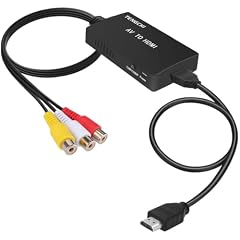
Tengchi RCA to HDMI Converter
Converts composite RCA input to HDMI output with external USB power for compatibility with HDMI-only TVs.
- Size (Pack of 1)
- Height 0.70 inches
- Length 5.90 inches
How to choose the best retro console for your TV
Your TV’s input type is the first criterion. If it has HDMI only, prioritize consoles with HDMI output or plan to buy a powered active converter.
Check the console’s native output: composite or RF outputs mean additional adapters are mandatory for HDMI TVs.
Consider the resolution the console outputs. Consoles with HDMI can often output 720p or 1080p, which works better on modern TVs than 480i analog signals.
Budget matters. HDMI-ready consoles cost more but avoid ongoing adapter issues and provide better image quality.
Think about space and cable clutter. HDMI-only setups reduce wires and simplify connection.
- TV inputs: identify HDMI, composite, or component ports
- Console output: prefer native HDMI for modern TVs
- Adapters: choose active powered converters if needed
- Resolution: HDMI supports higher resolutions than analog outputs
- Budget and setup: weigh upfront cost vs ongoing convenience
| Factor | Best Option | Trade-Off |
|---|---|---|
| TV Input Type | Match console output or use active adapter | Extra adapters add cost and complexity |
| Console Output | Native HDMI output | Higher upfront cost |
| Resolution | 720p or 1080p HDMI output | Some retro authenticity lost |
| Budget | Mid-range HDMI console or budget adapter | Adapters may degrade signal |
| Setup Complexity | Fewer cables with HDMI | Limited to certain consoles |
Choose retro consoles with native HDMI or ensure an active powered converter if using composite outputs for best TV compatibility.
Questions people still ask
Can I use a simple RCA to HDMI cable for my old console?
No. Simple RCA to HDMI cables are passive and do not convert signals. You need an active powered converter that converts analog composite to digital HDMI.
Why does my retro console show no picture on my new TV?
This usually happens because your TV lacks composite input and you’re using a passive cable. An active converter with power is needed for picture.
What is the difference between composite and component connections?
Composite combines video into one signal (yellow RCA) at 480i quality. Component splits video into three signals (red, green, blue RCA) allowing better quality but is less common for retro consoles.
Are all HDMI outputs on retro consoles the same quality?
No. Some HDMI retro consoles output at 720p, others at 1080p. Both are compatible with modern TVs but higher resolution delivers a sharper image.
Do all TVs support 480i video over HDMI?
No. Many modern TVs do not handle 480i over HDMI well, so converters that upscale to 720p or 1080p are preferred.